Take ready-made packages (pull from)
Compiling everything yourself is slow. Gentoo’s release engineers also publish binary packages of the common software, built with the default settings and signed with Gentoo’s release key; the University of Erlangen-Nürnberg (FAU) mirrors them, about 18,000 packages for amd64.
kaji can pull from a repository like that. Before it compiles a package, it asks: is this exact package, in this version, with these USE
flags, already there? If so, it downloads it, in seconds, instead of compiling it, which for something like gcc is hours.
Use the public one
kaji provides it: Binary repos > kaji/fau-gentoo. It is read-only; nothing is ever uploaded to it. In a package build, tick it under Pull from.

The public repository of FAU’s packages. Its mode is read-through: it is only read from.
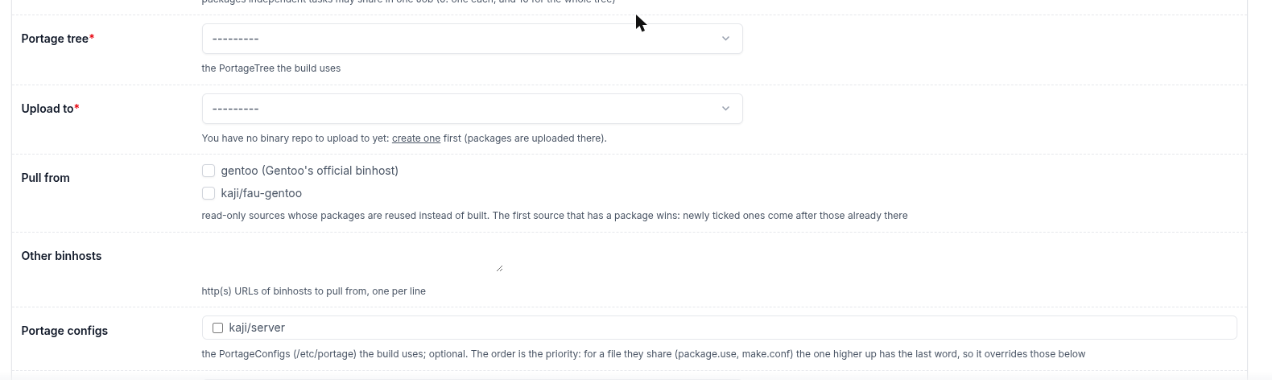
In the build, Pull from offers gentoo (Gentoo’s official binhost) and kaji/fau-gentoo. Below it, the configs you may use.
It has to match
A ready-made package is used only if it matches what your tree and config ask for: the same version, the same USE flags and the same profile. A package that does not match is compiled, and so is everything that depends on it. That is why a config that changes many flags (see Choose how packages are built (configs)) means more compiling: it is the price of your own settings. Without a config, you get the most reuse.
Pull-through: copy what is pulled
Tick Copy pulled in the build to make your repository a pull-through for the one you pull from: every package taken from it is also copied into yours, signature kept, so that your repository holds the whole closure on its own.
Why that matters:
A root filesystem is installed from your repository, so the packages it needs must be there.
Your repository keeps working if the other mirror changes or goes away.
The copies are cheap jobs: they download and upload, with no compiler. In the build’s graph they appear in a blue fetch band at the top.
Pulling from another repository of yours
Pull from lists the binary repositories you may read: yours, your organization’s and the public ones. The first that has a package wins, in the order they are listed. You can also give the address of another binary host.