Signing in and your organization
Open the console at https://console.kaji.systems.
Signing in
You sign in with a user name and password, or with GitHub when your administrator has turned that on. A new account is made by an invitation: the owner of an organization sends it by mail, and its link lets you choose your password. Your name, at the bottom of the sidebar, opens a small menu with your account, Change password, the walk-through (see The walk-through), the light or dark theme, and Log out.
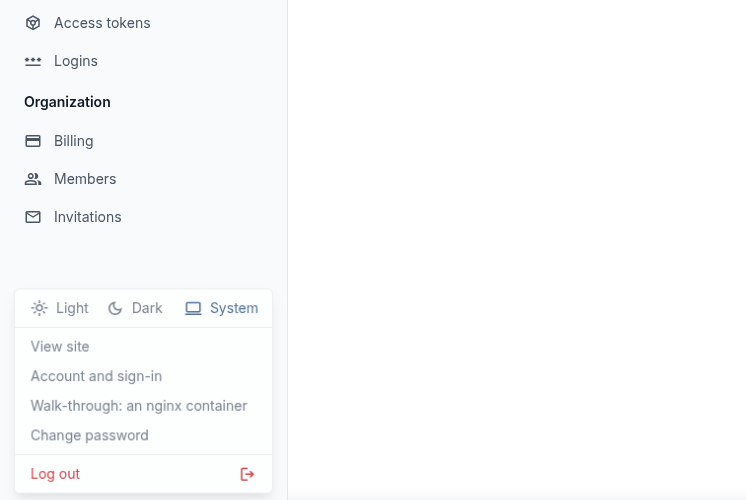
The menu under your name.
Organizations
Everything you make in kaji belongs to an organization, not to you personally. That is what lets a team share its work: the tree, the repositories and the builds your colleagues made are there for you too, and what you make is there for them.
An organization has members, and each has a role:
Role |
What it may do |
|---|---|
owner |
Everything a member may, and invites and removes members. |
member |
Sees everything the organization owns, makes new things and changes or deletes the organization’s. |
viewer |
Only reads. |
What you may see
What your organization owns.
What is public: shared with everybody, read-only. The ready-made Portage trees, binary repositories and configs that kaji provides are public and belong to the organization
kaji; they are listed askaji/gentoo-oldand so on.Your own secrets (keys and logins) are yours: a colleague can use one you shared, but never see it.
The sidebar lists everything you can make, from the top down in the order you will use it:
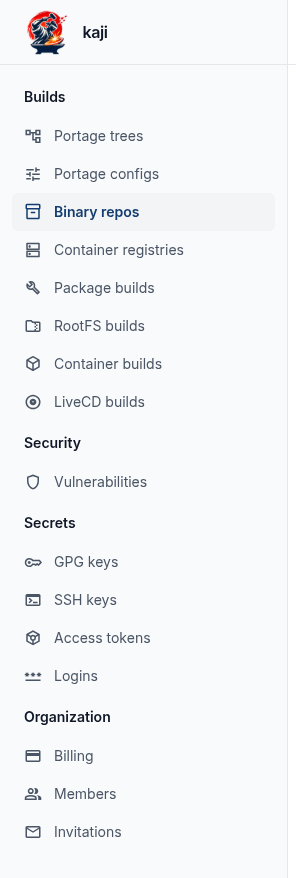
The sidebar. Builds holds the trees, configs, repositories, registries and the four kinds of build; Security the vulnerabilities; Secrets your keys and logins; Organization the members.
In the lists, the Organization column is the organization that owns a thing, and Created by is the person who made it. The name in the list
leaves out your organization’s prefix: a build the system knows as cp-nginx shows as nginx (point at the name to see the full one).

A list. The public trees belong to the organization kaji, so Created by is empty.
Note
If a menu entry or a button is missing, your role probably does not allow it. Ask an owner of your organization.